Viewing Service Active Users
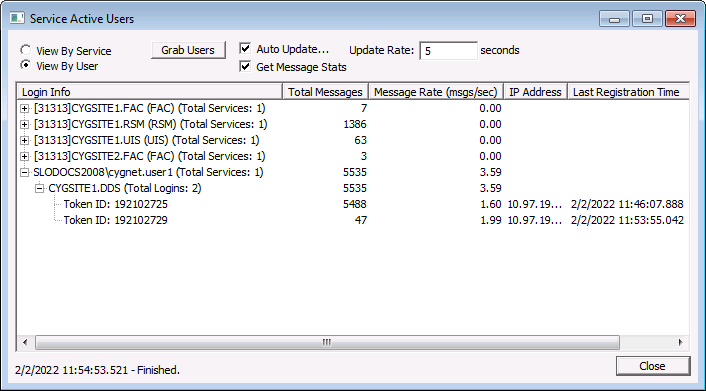
The Service Active Users dialog box is used to see which users and/or computers are connected to a given service. You can also see how many messages have been sent from each client connection. This is very helpful when you want to know which users are causing the most network traffic into a given service.
The Service Active Users dialog box is accessible from two places in CygNet Software:
- from CygNet Explorer, right-click on any service in the left-hand service hierarchy pane and select Service Details. Click Options on the lower left, and choose View Active Clients.
- from the CygNet Service Diagnostics utility, select View > Service Users for any selected service(s). You can also press Ctrl+U.
|
Service Active Users |
To View Active Users by Service or by User
- Open the Service Active Users dialog box.
- Select View By Service or View By User.
- Click Grab Users. The list of users is displayed in a hierarchical tree.
- Click Auto Update… to have the view update automatically and change the Update Rate as desired.
- Click Get Message Stats to view message statistics for the active users, if desired.

